Skip

Analytics for amoCRM

See how your sales team is doing at a glance

Savdix turns the deals and tasks in your amoCRM into ready-made reports: revenue, pipeline, managers, plan vs. actual. No more manual math in Excel.

  • No credit card
  • Connects in 2 minutes
  • Nothing changes in amoCRM
dash.savdix.uz
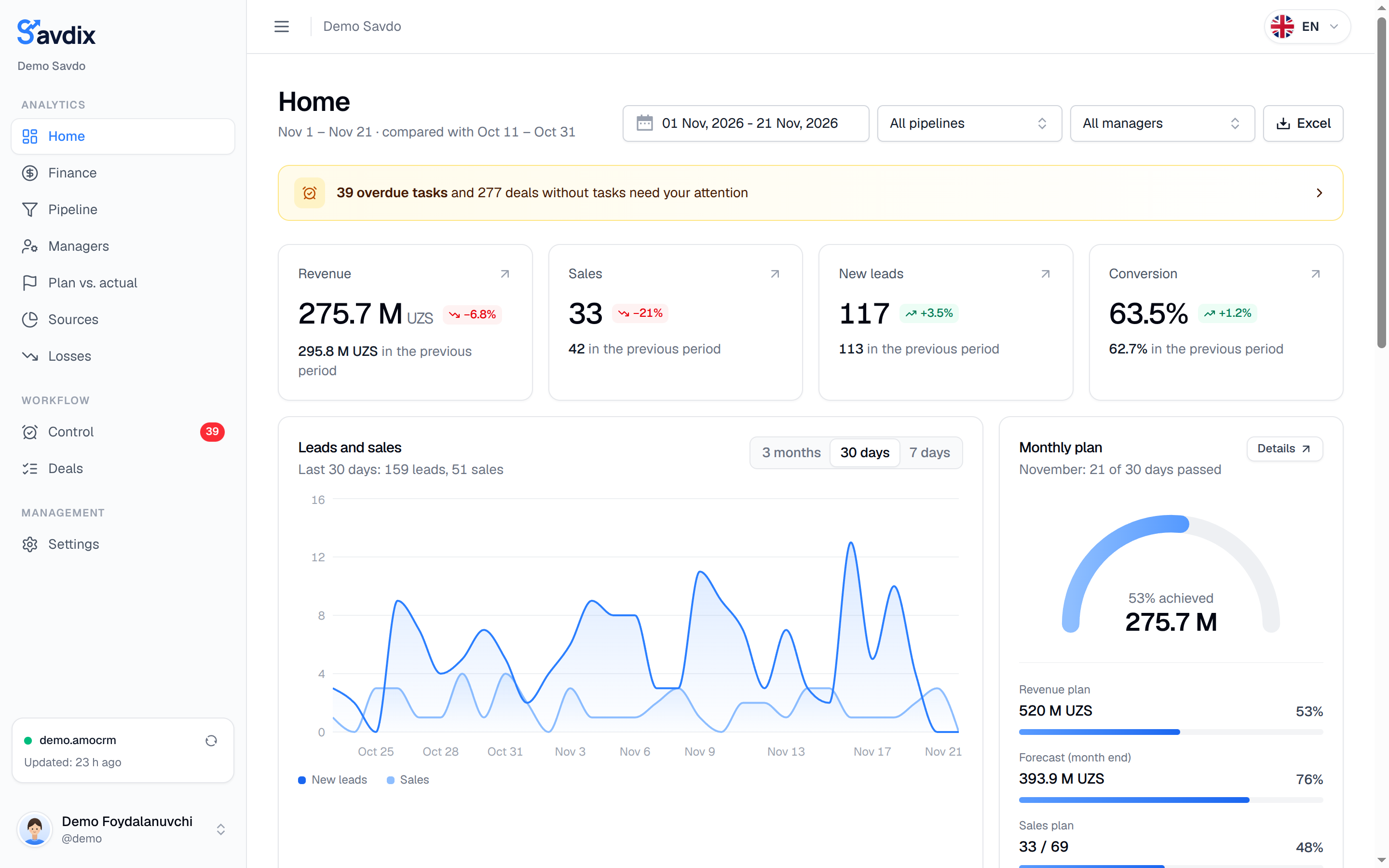
Savdix home: revenue, sales, new leads and conversion
sync with amoCRM every 2 minutes
2 min
ready-made report sections
9
languages: Uzbek, Russian, English, Kazakh, Kyrgyz
5
free trial
14 days

amoCRM collects the data. Savdix turns it into answers

Everything is in amoCRM, but answering “will we hit the plan this month?” means building reports by hand. Savdix does it for you.

Without Savdix: Adding up revenue in Excel at the end of the month

With Savdix: Revenue and average deal size update every 2 minutes

Without Savdix: Guessing which manager performs best

With Savdix: Manager leaderboard: revenue, conversion, overdue tasks

Without Savdix: No idea at which stage leads drop off

With Savdix: The pipeline shows the drop-off at every stage

Without Savdix: Finding forgotten deals by accident

With Savdix: Deals with no tasks or no activity in a separate list

Every number a sales head needs — in one dashboard

Each section answers a question: how much we sold, where we lose, who performs best and what needs attention.

Home

Revenue, sales and conversion — compared with the previous period

Key numbers and their trends on one screen, plus monthly plan progress and an end-of-month forecast.

  • Filter by period, pipeline and manager
  • Monthly plan and end-of-month forecast
  • Leads and sales trends
dash.savdix.uz
Savdix home: revenue, sales, new leads and conversion

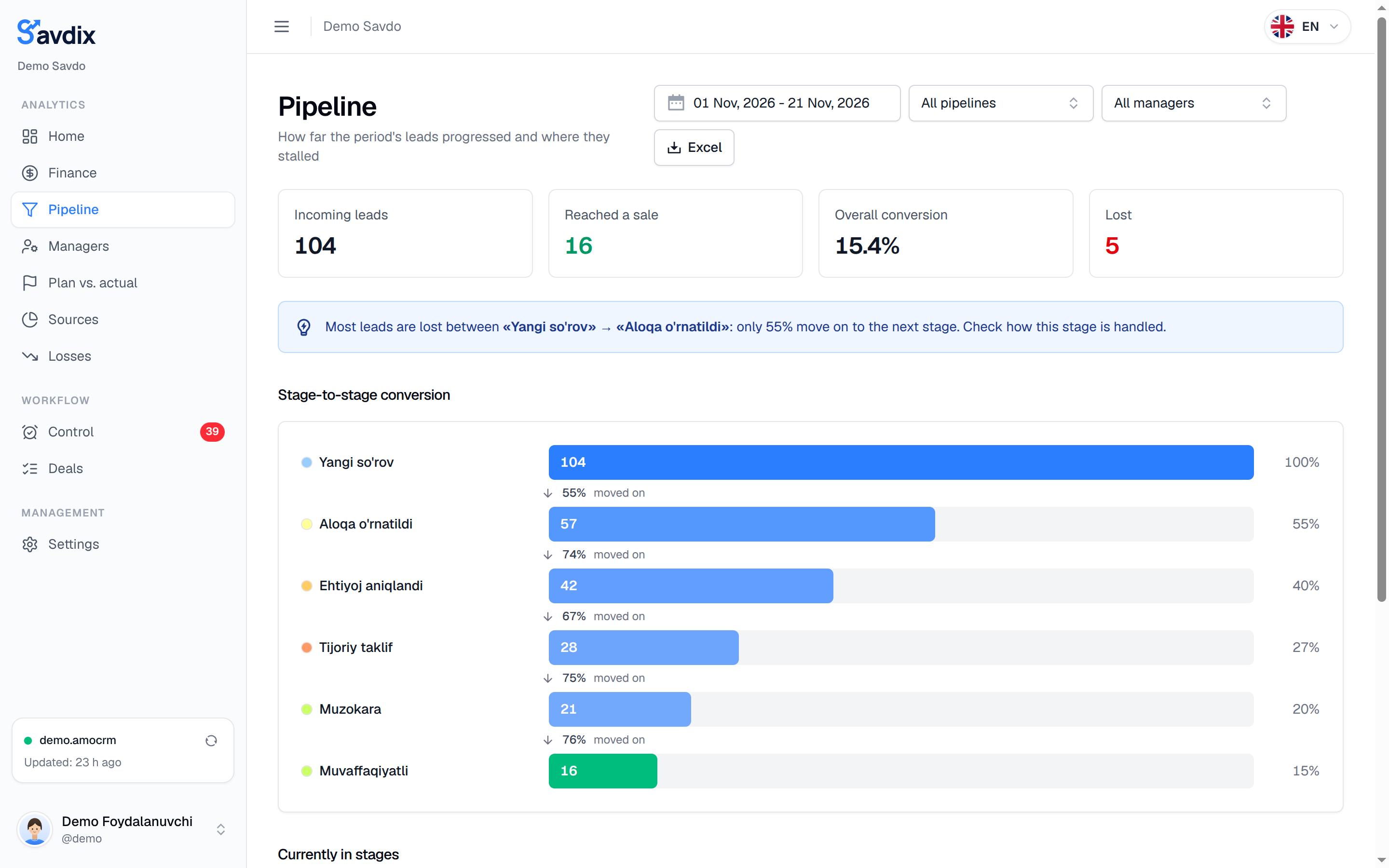
Pipeline

Know exactly where leads drop off

How many leads reached each stage, what share moved on and how many days deals spend in a stage on average.

  • Stage-to-stage conversion
  • The biggest drop-off is highlighted automatically
  • Current deals and amounts per stage
dash.savdix.uz
Savdix pipeline analysis: conversion by stage

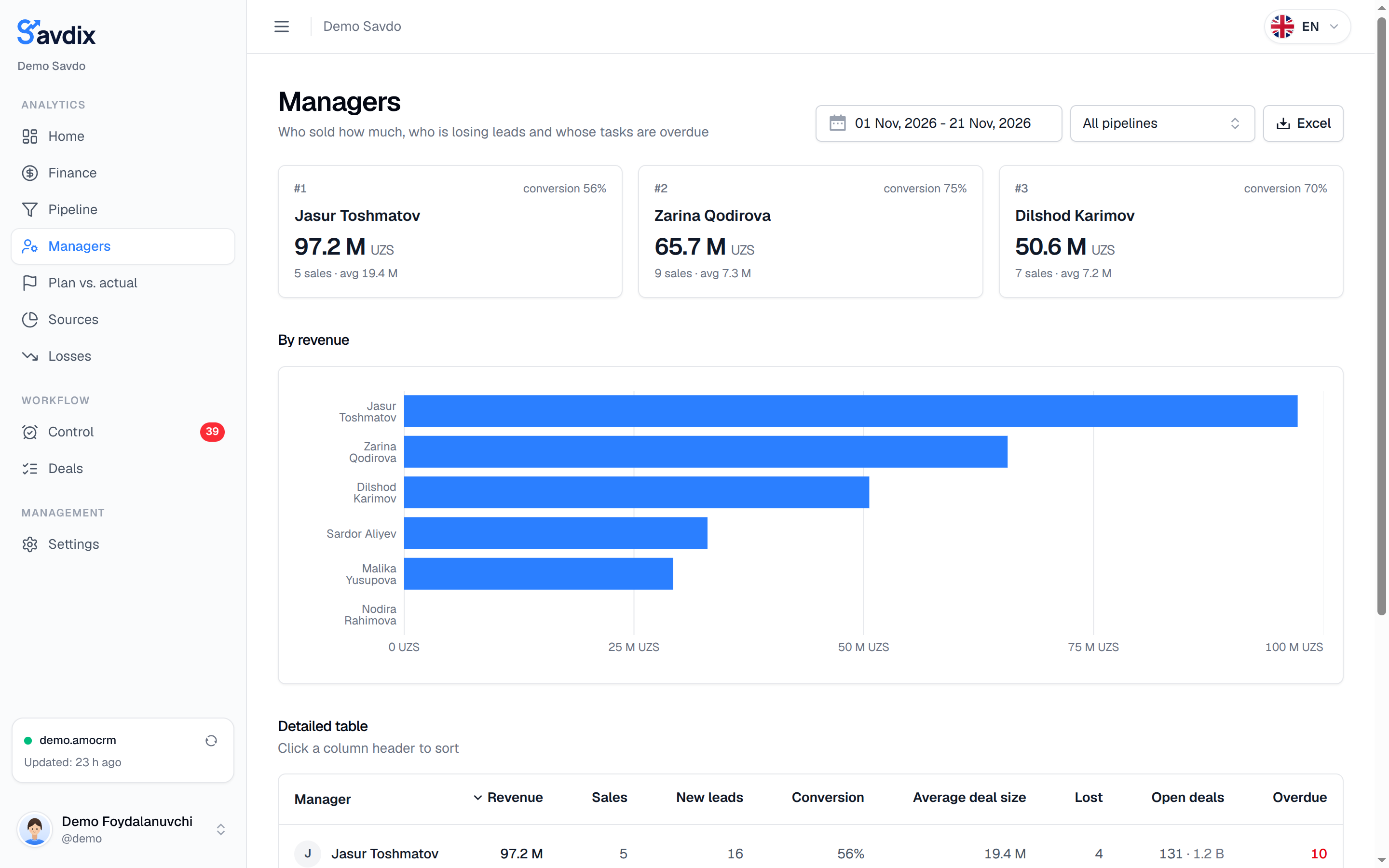
Managers

Who sold how much — and who needs help

For every manager: revenue, number of sales, average deal size, conversion, open deals and overdue tasks.

  • Leaderboard by revenue
  • Table sortable by any column
  • Individual plan for each manager
dash.savdix.uz
Savdix manager leaderboard by revenue

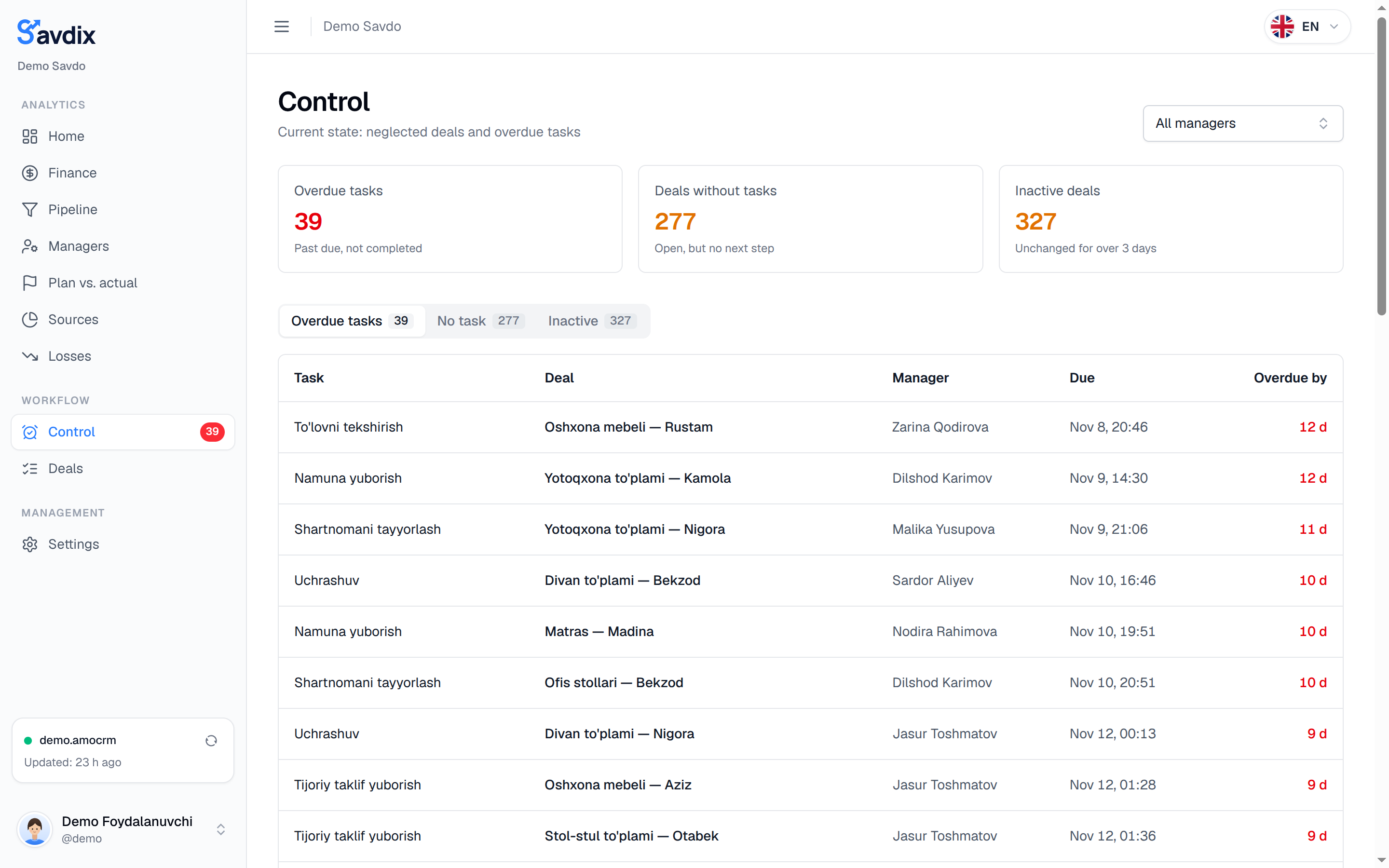
Control

Forgotten deals no longer slip away

Overdue tasks, deals with no next step and deals with no activity for 3+ days — all in one list.

  • Overdue tasks and days overdue
  • Deals without tasks
  • Inactive deals
dash.savdix.uz
Savdix control section: overdue tasks
  • Finance

    Revenue sources, split by pipeline and expected revenue.

  • Plan vs. actual

    Monthly plan for the company and each manager, with completion rate.

  • Sources

    Which channel brings more leads and money: Instagram, Telegram, website and more.

  • Losses

    Why deals are lost and how much money was lost.

  • Deal list

    New, won and lost deals — with amount, manager and source.

  • Excel export

    All reports in one tidy Excel file with a single click.

A report lands in Telegram every morning

Know how the day went without opening the dashboard. The bot sends short daily, weekly and monthly reports at the time you choose.

  • Daily, weekly and monthly reports
  • You pick the delivery time
  • One tap to open the dashboard
@crmhisobot_bot
S

Savdix

bot

📊 Monthly report · Demo Savdo

This month · November 2026

💰 Revenue: 275,700,000 UZS · ↓ 36%

✅ Sales: 33 · avg. deal 8.4 M

🆕 New leads: 117

🎯 Conversion: 63%

👥 Top performers

🥇 Jasur Toshmatov — 97.2 M

🥈 Zarina Qodirova — 65.7 M

🥉 Dilshod Karimov — 50.6 M

⚠️ Needs attention

⏰ 36 tasks are overdue

💤 252 deals inactive for over 3 days

7:00 PM

Details in the dashboard ↗

Your data stays safe and always fresh

Savdix connects to amoCRM read-only and keeps the data in its own database. That keeps the dashboard fast and amoCRM unaffected.

  • Read-only

    Savdix never changes or deletes anything in amoCRM.

  • Sync every 2 minutes

    Only changed deals and tasks are fetched. You can also refresh manually.

  • Google Sheets

    Reports flow into your own sheet with one formula — no Excel export.

  • 5 languages

    Dashboard, bot and Excel in Uzbek, Russian, English, Kazakh and Kyrgyz.

Up and running in 3 steps

  1. 1

    Sign in with amoCRM

    No sign-up form or password — you log in with your amoCRM account.

  2. 2

    Approve the connection

    Your amoCRM admin grants access. The first import takes a few minutes.

  3. 3

    Get your reports

    The dashboard is ready. Connect Telegram and reports arrive every day.

Frequently asked questions

What is Savdix?

Savdix is a sales analytics service for amoCRM. It reads deals, tasks and stage changes in amoCRM and builds ready-made reports and Telegram notifications for the head of sales.

Will my amoCRM data change?

No. Savdix connects to amoCRM read-only: it never changes or deletes deals, contacts or tasks.

How often is the data updated?

Automatically every 2 minutes. Only changed records are fetched, so amoCRM is not loaded. You can also refresh instantly with the Refresh button.

What do I need to connect?

An amoCRM account and permission from its administrator. Nothing to install and no developer needed — connecting takes about 2 minutes.

Is there a free trial?

Yes, 14 days free with no credit card. For plans and payment, contact us in Telegram.

Can I export reports to Excel or Google Sheets?

Yes. Every page can be downloaded as an Excel file, and for Google Sheets you get a ready formula that fills the sheet automatically.

Which languages are supported?

The dashboard, Telegram bot and Excel reports are available in Uzbek, Russian, English, Kazakh and Kyrgyz.

Connect today — get your first report tomorrow morning

14 days free. No card. Your amoCRM data stays untouched.